Modern Angular Architecture: Standalone Components & Signals
Standalone Components (Angular 15+)
Standalone components represent a significant shift in Angular’s architecture, moving away from NgModules towards a more streamlined approach:
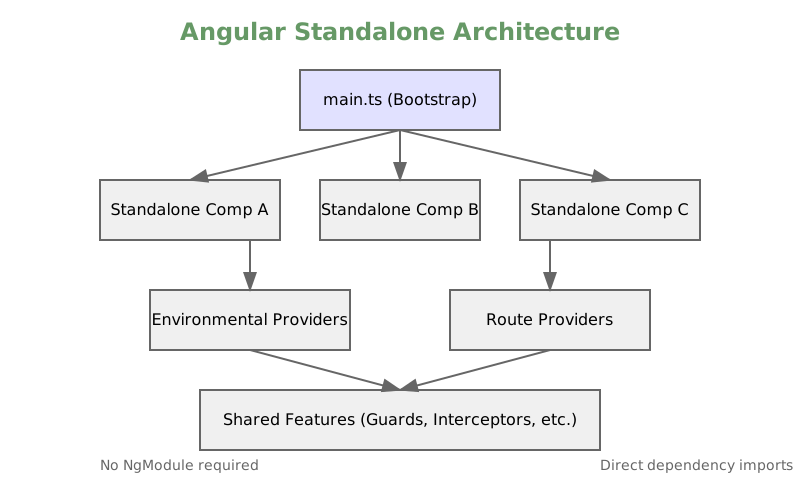
Basic Standalone Component
@Component({
  standalone: true,
  selector: 'app-user-profile',
  imports: [
    CommonModule,
    RouterModule,
    SharedComponents
  ],
  template: `
    <div class="profile">
      <h2>{{ user().name }}</h2>
      <shared-avatar [url]="user().avatar"/>
      <button (click)="updateProfile()">Update</button>
    </div>
  `
})
export class UserProfileComponent {
  // Using signals for reactive state
  user = signal<User>({
    name: 'John Doe',
    avatar: 'avatar.jpg'
  });

  constructor(private userService: UserService) {}
}
Bootstrapping Standalone Applications
// main.ts
import { bootstrapApplication } from '@angular/platform-browser';
import { AppComponent } from './app/app.component';
import { provideRouter } from '@angular/router';
import { provideHttpClient } from '@angular/common/http';

bootstrapApplication(AppComponent, {
  providers: [
    provideRouter(routes),
    provideHttpClient(),
    provideAnimations(),
    {
      provide: API_URL,
      useValue: environment.apiUrl
    }
  ]
}).catch(err => console.error(err));
Lazy Loading with Standalone Components
// app.routes.ts
export const routes: Routes = [
  {
    path: 'users',
    loadComponent: () =>
      import('./users/user-list.component')
        .then(m => m.UserListComponent)
  },
  {
    path: 'admin',
    loadChildren: () =>
      import('./admin/routes')
        .then(m => m.ADMIN_ROUTES)
  }
];

// admin/routes.ts
export const ADMIN_ROUTES: Routes = [
  {
    path: '',
    component: AdminDashboardComponent,
    providers: [AdminService]
  }
];
Signals (Angular 16+)
Signals introduce a new reactive primitive for managing state and side effects:
Basic Signal Usage
@Component({
  standalone: true,
  template: `
    <div>
      <h2>Counter: {{ count() }}</h2>
      <p>Double: {{ doubleCount() }}</p>
      <button (click)="increment()">Increment</button>
    </div>
  `
})
export class CounterComponent {
  // Create a signal
  count = signal(0);

  // Computed signal
  doubleCount = computed(() => this.count() * 2);

  // Effect for side effects
  constructor() {
    effect(() => {
      console.log(`Count changed to: ${this.count()}`);
    });
  }

  increment() {
    // Update signal value
    this.count.update(count => count + 1);
  }
}
Advanced Signal Patterns
@Injectable({ providedIn: 'root' })
export class UserStore {
  // State management with signals
  private userState = signal<UserState>({
    users: [],
    loading: false,
    error: null
  });

  // Computed properties
  users = computed(() => this.userState().users);
  loading = computed(() => this.userState().loading);
  error = computed(() => this.userState().error);

  constructor(private http: HttpClient) {}

  loadUsers() {
    // Update loading state
    this.userState.update(state => ({
      ...state,
      loading: true
    }));

    this.http.get<User[]>('/api/users').pipe(
      finalize(() => {
        this.userState.update(state => ({
          ...state,
          loading: false
        }));
      })
    ).subscribe({
      next: (users) => {
        this.userState.update(state => ({
          ...state,
          users,
          error: null
        }));
      },
      error: (error) => {
        this.userState.update(state => ({
          ...state,
          error: error.message
        }));
      }
    });
  }
}
Signal-based HTTP State Management
@Injectable({ providedIn: 'root' })
export class DataService {
  private cache = signal<Map<string, any>>(new Map());

  private loading = signal<Set<string>>(new Set());

  isLoading = (key: string) => computed(() =>
    this.loading().has(key)
  );

  getData<T>(url: string) {
    const cached = this.cache().get(url);
    if (cached) return signal<T>(cached);

    // Add to loading set
    this.loading.update(set => {
      set.add(url);
      return new Set(set);
    });

    this.http.get<T>(url).pipe(
      finalize(() => {
        this.loading.update(set => {
          set.delete(url);
          return new Set(set);
        });
      })
    ).subscribe(data => {
      this.cache.update(map => {
        map.set(url, data);
        return new Map(map);
      });
    });

    return computed(() => this.cache().get(url) as T);
  }
}
Benefits of Modern Angular Architecture
Simplified Architecture
- No need for NgModules
- Direct dependency imports
- Clearer dependency tree
Better Performance
- Fine-grained reactivity with signals
- More efficient change detection
- Better tree-shaking
Improved Developer Experience
- Less boilerplate code
- More intuitive state management
- Better TypeScript integration
Enhanced Testing
- Easier to test standalone components
- Better signal debugging
- Simplified dependency injection
Interview Tips
When discussing modern Angular architecture:
Highlight Evolution
- Explain the move from NgModules to standalone
- Discuss the benefits of signals over traditional observables
- Mention performance improvements
Real-world Applications
- Share experiences migrating to standalone components
- Discuss signal-based state management patterns
- Explain when to use signals vs. observables
Best Practices
- Discuss organizing standalone applications
- Explain signal computation optimization
- Share patterns for scalable architecture
Future Considerations
- Discuss Angular’s roadmap
- Mention upcoming features
- Consider migration strategies
Test Your Knowledge
Take a quick quiz to test your understanding of this topic.